AWS Instance Stores
AWS Tutorial: EC2 Instance Stores
Welcome to the EC2 Instance Stores lesson. When you launch a virtual server in AWS, you have different options for where its hard drive physically lives. The fastest, but most temporary, option is an Instance Store.
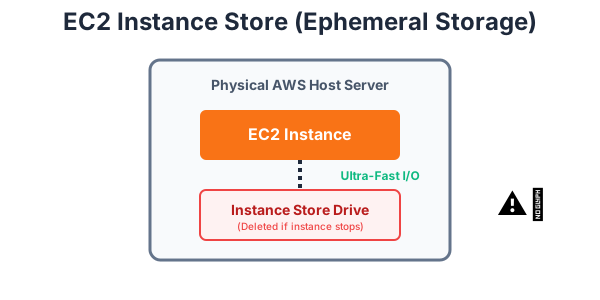
Why Learn About Instance Stores?
If you mistakenly save your application's database to an Instance Store, all of your user data will be permanently deleted the moment the server restarts. Understanding ephemeral (temporary) storage is critical for preventing catastrophic data loss in the cloud.
Tutorial Overview
In this tutorial, you will learn:
- What an EC2 Instance Store is.
- The difference between persistent and ephemeral storage.
- The best use cases for Instance Stores.
What is an Instance Store?
An Instance Store provides temporary block-level storage for your Amazon EC2 instance. This storage is located on disks that are physically attached to the host computer (the actual metal server sitting in the AWS data center) that is running your EC2 instance.
Because the hard drive is physically inside the same machine as your CPU, the read/write speeds (I/O performance) are incredibly fast.
The Catch: Ephemeral Storage
Instance store data is ephemeral (temporary). If your EC2 instance is stopped, terminated, or if the underlying physical drive fails, any data on the Instance Store is lost forever. It cannot be recovered.
When Should You Use It?
Because data is lost when the instance stops, you should never use an Instance Store for databases or user uploads. Instead, it is perfectly suited for temporary data that changes frequently, such as:
- Caches (like Redis or Memcached).
- Buffers and scratch data.
- Temporary files generated during batch processing.
- Data replicated across a fleet of instances (where losing one copy doesn't matter).
Exercise
?What happens to the data stored on an EC2 Instance Store if the EC2 instance is stopped or terminated?