AWS ECS
AWS Tutorial: Amazon Elastic Container Service (ECS)
Welcome to the Amazon ECS lesson. When you need to run Docker containers at scale across a cluster of servers, AWS provides Amazon Elastic Container Service (ECS) to handle the heavy lifting.
Why Learn Amazon ECS?
Amazon ECS is heavily used by companies because it is an AWS-native solution. It integrates flawlessly with AWS networking (VPCs), security (IAM), and load balancers. If you want a fast, secure, and relatively straightforward way to run containers in AWS without the steep learning curve of Kubernetes, ECS is your answer.
Tutorial Overview
In this tutorial, you will learn:
- What Amazon ECS is.
- The core components of ECS: Clusters, Services, and Tasks.
Core Components of ECS
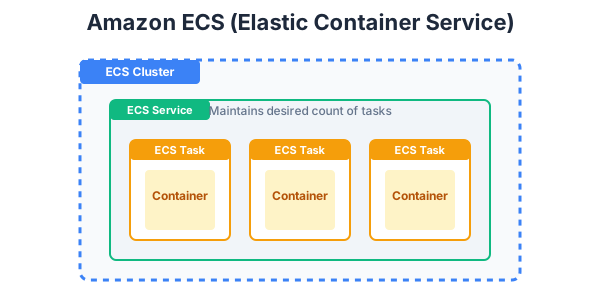
To understand ECS, you need to understand its hierarchy:
- Task Definition: This is the blueprint for your application. It is a JSON file that describes which Docker image to use, how much CPU and memory it needs, and what ports to open.
- Task: A Task is the actual running instance of a Task Definition. It is your active container running on a server.
- Service: A Service ensures that a specified number of Tasks are constantly running. If a Task crashes, the Service will automatically start a new one to replace it. The Service is also responsible for connecting your Tasks to an Elastic Load Balancer.
- Cluster: A logical grouping of EC2 servers (or serverless Fargate capacity) that your Tasks are placed on.
By defining these components, ECS automatically figures out the best server in your cluster to place your container on based on available CPU and memory!
Exercise
?In Amazon ECS, what acts as the "blueprint" describing the Docker image, CPU, and memory requirements for your container?