DSA Trees
Introduction to Trees
Key Takeaways: A Tree is a non-linear, hierarchical data structure. Unlike Arrays or Linked Lists which organize data in a straight line, Trees organize data like branches on a family tree or folders on a computer.
So far, every data structure we have learned (Arrays, Linked Lists, Stacks, Queues) has been Linear. Data goes in a straight, sequential line from start to finish.
However, many real-world problems are not linear. They are Hierarchical. To solve these problems, Computer Scientists invented the Tree data structure!
1. What is a Tree?
A Tree is a collection of entities called Nodes.
Nodes are connected by edges (links). Each node contains a value or data, and it may or may not have a child node.
Real-Life Examples of Trees:
- File Systems: Your computer has a
C:drive (Root). Inside it are folders likeUsersandWindows. InsideUsersare more folders likeDocumentsandDownloads. - Corporate Org Charts: The CEO is at the top. Below the CEO are the Vice Presidents. Below the VPs are the Managers, and so on.
- HTML DOM: The
<html>tag is the root. Inside are<head>and<body>tags, which contain more tags!
2. Tree Terminology
Before we can write code for Trees, you absolutely must know the terminology. It comes up in every technical interview!
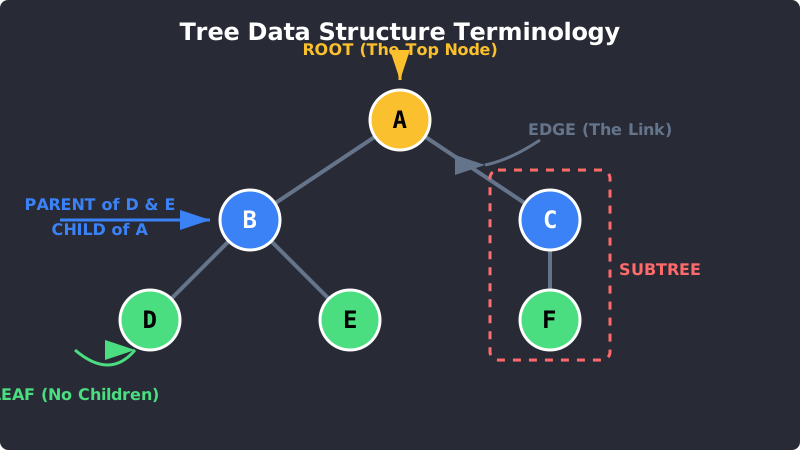
Tree Terminology: Notice how it looks like a real tree turned upside down!
Here is your cheat sheet:
- Root: The very topmost node of the tree. A tree can only have one root.
- Edge: The connecting link between any two nodes.
- Parent: A node that has branches leading to other nodes below it.
- Child: A node that has a parent above it. (All nodes except the Root are children).
- Leaf: A node at the very bottom of the tree that has no children.
- Subtree: Any node of the tree and all of its descendants forming a smaller tree inside the main tree.
- Height / Depth: How many "levels" deep the tree goes.
3. Why use Trees?
If Arrays and Hash Maps are so fast, why do we need Trees?
- Hierarchy: Sometimes data must be structured hierarchically. You cannot represent a computer file system properly using a flat Array.
- Fast Searching: Searching an Array takes
O(n)time. But if you organize your data into a special type of tree (like a Binary Search Tree), you can search it inO(log n)time. It is much faster! - Flexible Size: Like Linked Lists, Trees use Pointers. They can grow and shrink dynamically without memory fragmentation issues.
4. Coding a Basic Tree (Python)
Let's write a simple Python script to create a Tree Node.
Unlike a Linked List node which only has one next pointer, a Tree node can have a list of children pointers!
Basic Tree Implementation
# 1. Create the TreeNode Class
class TreeNode:
    def __init__(self, data):
        self.data = data
        # A node can have multiple children!
        self.children = []
    def add_child(self, child_node):
        self.children.append(child_node)
# 2. Build the Tree (Like an Org Chart)
root = TreeNode("CEO")
vp_sales = TreeNode("VP of Sales")
vp_tech = TreeNode("VP of Tech")
manager1 = TreeNode("Sales Manager")
engineer1 = TreeNode("Lead Engineer")
# 3. Connect the Nodes
root.add_child(vp_sales)
root.add_child(vp_tech)
vp_sales.add_child(manager1)
vp_tech.add_child(engineer1)
# 4. Test it out!
print("Root:", root.data)
print("CEO's Children:")
for child in root.children:
    print("-", child.data)
Exercise 1 of 1
?In Tree terminology, what is a "Leaf"?