Arrays in DSA
Introduction to Arrays
Key Takeaways: Arrays store elements of the same type in contiguous memory locations. This allows for lightning-fast O(1) access times when retrieving an element by its index. Because of their efficiency, they are the foundational building blocks for almost every other complex data structure.
The Array is arguably the most fundamental and widely used data structure in all of computer science. Almost every other complex data structure (like Stacks, Queues, and Hash Tables) can be built using arrays under the hood.
If you want to master Data Structures and Algorithms (DSA), you absolutely must understand how arrays work, how they are stored in memory, and what their strengths and weaknesses are.
1. What is an Array?
An Array is a linear data structure that collects items of the same data type and stores them in contiguous (side-by-side) memory locations.
Real-Life Analogy
Think of an array like a weekly pill organizer or a row of lockers.
- All the compartments are grouped together in a single row.
- Each compartment has a specific position (Monday, Tuesday, Wednesday...).
- You can instantly open Wednesday's compartment without having to open Monday's and Tuesday's first.
2. Arrays in Computer Memory
When you create an array, the computer reserves a single, unbroken block of memory.
Because the items are stored right next to each other, the computer can calculate exactly where any item is located using simple math. This is why arrays use an Index to access elements, and why indexing almost always starts at 0.
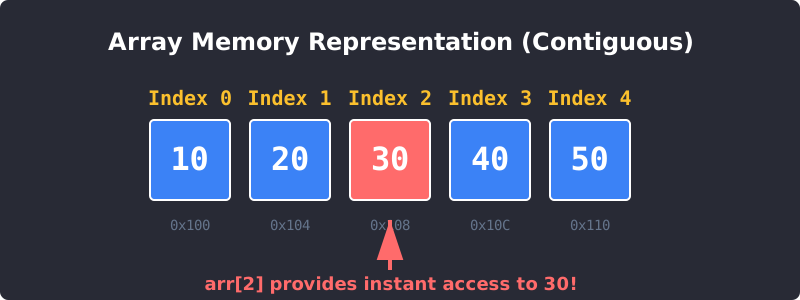
Arrays store data contiguously. Index 0 is the starting address, Index 1 is the next slot, and so on.
The index represents the offset from the beginning of the array. The first element has an offset of 0 (it is exactly at the starting line), which is why we access it using arr[0].
3. Basic Array Operations & Time Complexity
Let's look at how efficiently an array handles standard operations using Big O Notation.
Accessing Elements (Read) - O(1) Fast!
If you know the index of the item you want, the computer jumps directly to that memory address instantly. It takes the exact same amount of time to access the 1st element as it does to access the 1,000,000th element. This is called O(1) or Constant Time.
Searching for Elements - O(n) Slow
If you don't know the index, and you are just looking for the value "30", you have to check the first box, then the second box, then the third box until you find it. If the array has n elements, it could take up to n steps. This is called O(n) or Linear Time. (Note: If the array is sorted, you can use Binary Search to find it in O(log n) time!)
Inserting/Deleting at the End - O(1) Fast!
Adding an item to the very end of an array (often called appending) or removing the last item is extremely fast, as nothing else needs to move.
Inserting/Deleting in the Middle - O(n) Slow
If you want to insert a new number at Index 0, you can't just overwrite what is currently there. You have to take the element at Index 0 and shift it to Index 1. But wait, now you have to shift Index 1 to Index 2... all the way to the end of the array!
Because inserting or deleting at the front of an array requires shifting every single element, the time complexity is O(n).
4. Static vs Dynamic Arrays
In Computer Science, arrays come in two flavors:
- Static Arrays: When you create them, you must tell the computer exactly how many items they will hold (e.g., exactly 5 items). The size cannot change. Languages like C and Java use static arrays by default.
- Dynamic Arrays: These arrays resize themselves automatically as you add more elements. Languages like Python (
Lists) and JavaScript (Arrays) use dynamic arrays under the hood.
Note: How do Dynamic Arrays resize? When a dynamic array runs out of space, the computer creates a brand new array that is double the size, copies all the old elements over to the new array, and deletes the old one!
5. Coding Example (Python Lists)
Let's write some simple code to interact with an array. We will use Python, where arrays are officially called Lists, but they function as dynamic arrays.
Array Operations in Python
# 1. Creating an array (List)
my_array = [10, 20, 30, 40, 50]
# 2. Accessing an element (O(1) time)
print("Element at index 2 is:", my_array[2])
# 3. Updating an element (O(1) time)
my_array[0] = 99
print("Array after update:", my_array)
# 4. Appending to the end (O(1) time)
my_array.append(60)
print("Array after append:", my_array)
# 5. Inserting in the middle (O(n) time - elements must shift!)
my_array.insert(1, 15)
print("Array after insert:", my_array)
6. Pros and Cons of Arrays
To become a great software engineer, you must know when to use an array, and when to avoid it.
Pros (When to use them):
- Lightning Fast Lookups: If you know the index, you can retrieve data in
O(1)time. - Memory Efficient: They don't require any extra memory to store pointers or links to other items.
- Iteration: Because memory is contiguous, looping through an array from start to finish is highly optimized by modern CPU caches.
Cons (When to avoid them):
- Fixed Size (Static Arrays): You must know how much data you have upfront. If you guess too high, you waste memory. If you guess too low, the program crashes.
- Slow Insertions/Deletions: Removing or adding items at the beginning or middle of an array forces you to shift all subsequent elements, which is extremely slow for large datasets.
In the next tutorial, we will look at Linked Lists, a data structure specifically designed to solve the slow insertion/deletion problem of Arrays!
7. Algorithm Time Complexity
Run Time
When exploring algorithms, we often look at how much time an algorithm takes to run relative to the size of the data set.
In the array examples above, the time the algorithm needs to run to find a specific value (without knowing its index) is proportional, or linear, to the size of the data set. This is because the algorithm must visit every array element one time to check its value. The loop must run 5 times since there are 5 values in the array. And if the array had 1,000 values, the loop would have to run 1,000 times!
See the graph below to understand this relationship between the number of operations needed and the size of the array for different time complexities. Each algorithm in this tutorial will be presented together with its time complexity.
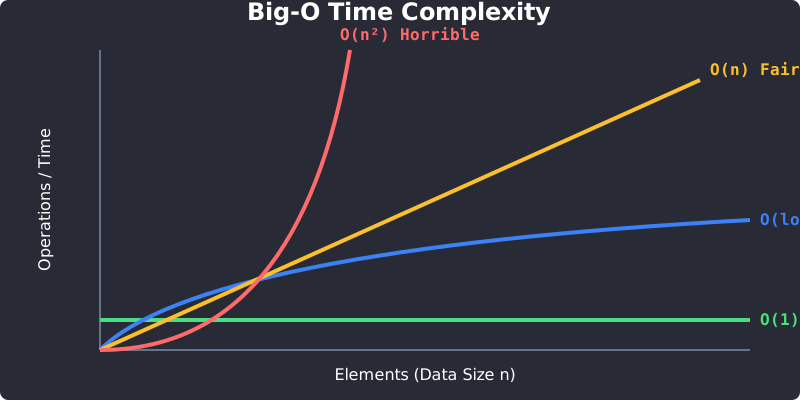
Big O Time Complexity Graph: Comparing O(1), O(log n), O(n), and O(n²).
Exercise 1 of 2
?Why is accessing an element in an array using its index so fast (O(1) time)?
Exercise 2 of 2
?What happens when you insert a new element at the very beginning (Index 0) of an array?