Simple Algorithms
Simple Algorithms for Beginners
Now that you know what Data Structures and Algorithms are, it is time to look at some of the most fundamental Algorithms used in Computer Science.
In this tutorial, we will explore three simple but powerful algorithms: Linear Search, Binary Search, and Bubble Sort. These form the building blocks for almost every complex operation in software development.
1. Linear Search (The Simplest Algorithm)
Linear Search is the most basic searching algorithm. It involves looking at every single element in a data structure (like an array) one by one, from the beginning to the end, until you find what you are looking for.
Real-Life Analogy
Imagine you lost your keys in a row of 10 lockers. You start at locker 1, open it, and check for the keys. If they aren't there, you move to locker 2. You repeat this until you either find the keys or run out of lockers.
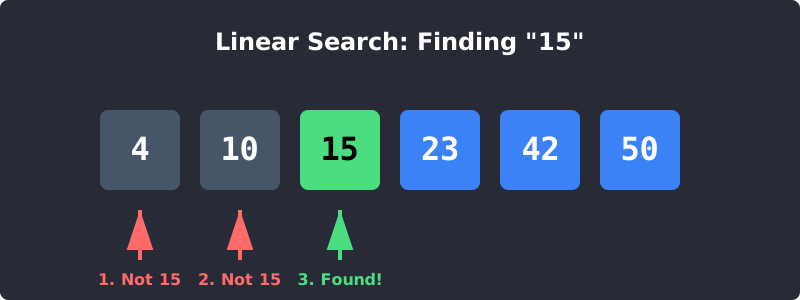
Linear Search: Checking each element one after the other.
Linear Search Code Example
Here is how you would write a Linear Search in Python.
Linear Search Algorithm
def linear_search(arr, target): # Loop through each item in the array for i in range(len(arr)): if arr[i] == target: return f"Found {target} at index {i}" return f"{target} not found in the array."numbers = [4, 10, 15, 23, 42, 50] print(linear_search(numbers, 15)) print(linear_search(numbers, 100))
Time Complexity: O(n). In the worst-case scenario, you have to check every single item.
2. Binary Search (The Smart Search)
Binary Search is a much faster searching algorithm, but it comes with a strict rule: The data must be sorted first!
Instead of checking every element sequentially, Binary Search divides the search space in half repeatedly.
Real-Life Analogy
Imagine looking for the word "Algorithm" in a physical Dictionary. You don't read page 1, page 2, page 3 (Linear Search). Instead, you open the book exactly in the middle.
- If the middle page starts with "M", you know "Algorithm" (A) must be in the left half.
- You mentally tear off the right half, ignore it, and split the remaining left half in the middle again. You repeat this until you find the word!
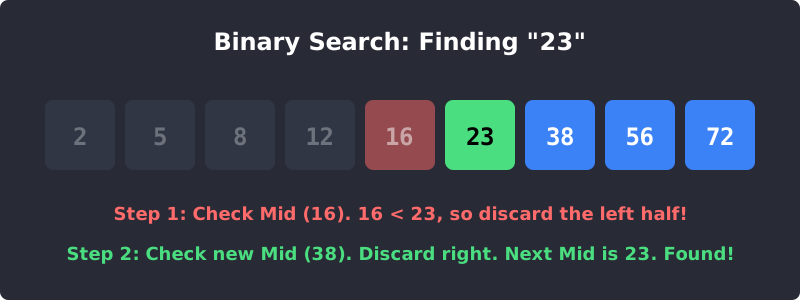
Binary Search: Eliminating half the possibilities with every step.
Binary Search Code Example
Binary Search Algorithm
def binary_search(arr, target): left = 0 right = len(arr) - 1 while left <= right: mid = (left + right) // 2 # Find the middle point if arr[mid] == target: return f"Found {target} at index {mid}" elif arr[mid] < target: left = mid + 1 # Search the right half else: right = mid - 1 # Search the left half return f"{target} not found."// The array MUST be sorted! sorted_numbers = [2, 5, 8, 12, 16, 23, 38, 56, 72, 91] print(binary_search(sorted_numbers, 23))
Time Complexity: O(log n). This is incredibly fast! If you have 1,000,000 sorted items, Linear Search might take 1,000,000 steps. Binary Search takes a maximum of 20 steps!
3. Bubble Sort (The Beginner Sorting Algorithm)
Algorithms aren't just for searching; they are also used for Sorting. Sorting means arranging data in a specific order (e.g., from lowest to highest).
Bubble Sort is a simple sorting algorithm that repeatedly steps through the list, compares adjacent elements, and swaps them if they are in the wrong order. The largest elements "bubble" up to the end of the list.
Real-Life Analogy
Imagine a line of people of random heights. You want them lined up from shortest to tallest. You compare the first two people. If the left person is taller, they swap places. Then you compare the second and third person. You do this all the way down the line. By the end of the first pass, the tallest person is at the very end. You repeat this until everyone is perfectly sorted.
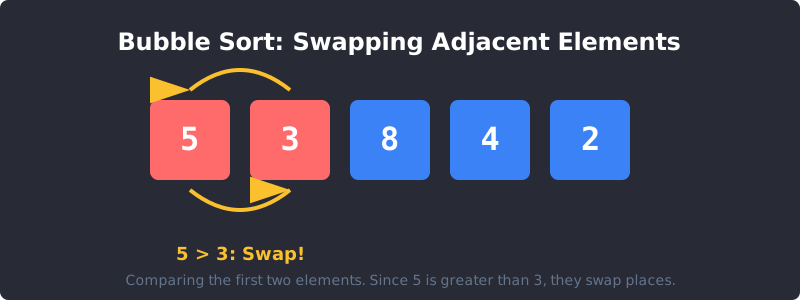
Bubble Sort: Pushing the largest values to the right side step-by-step.
Bubble Sort Code Example
Bubble Sort Algorithm
def bubble_sort(arr): n = len(arr) # Traverse through all array elements for i in range(n): # Last i elements are already in place for j in range(0, n-i-1): # Swap if the element found is greater than the next element if arr[j] > arr[j+1]: arr[j], arr[j+1] = arr[j+1], arr[j] return arrunsorted_list = [64, 34, 25, 12, 22, 11, 90] print("Sorted array:", bubble_sort(unsorted_list))
Time Complexity: O(n²). Because we have loops inside of loops, Bubble Sort is very slow for large datasets. In real-world applications, faster algorithms like Merge Sort or Quick Sort are typically used.
Exercise 1 of 2
?What is the main requirement for using Binary Search?
Exercise 2 of 2
?Which search algorithm is generally faster for a massive dataset of 1 million sorted items?