Linear Sorting
Linear Sorting Algorithms
Key Takeaways: Most popular sorting algorithms (like Merge Sort and Quick Sort) are mathematically limited to a speed of O(n log n) because they rely on comparing elements. Linear Sorting Algorithms skip the comparisons entirely, allowing them to sort data in blistering O(n) time under the right conditions!
If you have followed our tutorials on Counting Sort and Radix Sort, you have already used Linear Sorting!
In this chapter, we will introduce the general concept of $O(n)$ time sorting and explore another famous algorithm in this family: Bucket Sort.
1. What makes a Sort "Linear"?
Comparison-based algorithms must ask, "Is element A larger than element B?" over and over again. Computer Science mathematically proves that the absolute fastest you can do this is O(n log n).
To achieve Linear Time O(n), you cannot compare elements directly. Instead, you use the properties of the data itself (like its digits, ranges, or frequencies) to place the elements directly into their correct sorted position.
Common Linear Sorts:
- Counting Sort: Best when numbers have a small, known maximum value.
- Radix Sort: Best when numbers have many digits.
- Bucket Sort: Best when numbers are evenly distributed across a range (like decimals between 0.0 and 1.0).
2. How Does Bucket Sort Work?
Bucket Sort is incredibly easy to understand. It divides the array into a number of smaller "buckets."
Real-Life Analogy
Imagine you work at a post office sorting mail for different Zip Codes. Instead of comparing two random letters, you just throw the letter into the "New York Box," the "California Box," or the "Texas Box."
Once all the mail is in the correct boxes, you sort the small piles inside each box individually. Finally, you just grab the boxes in order, and all the mail is sorted!
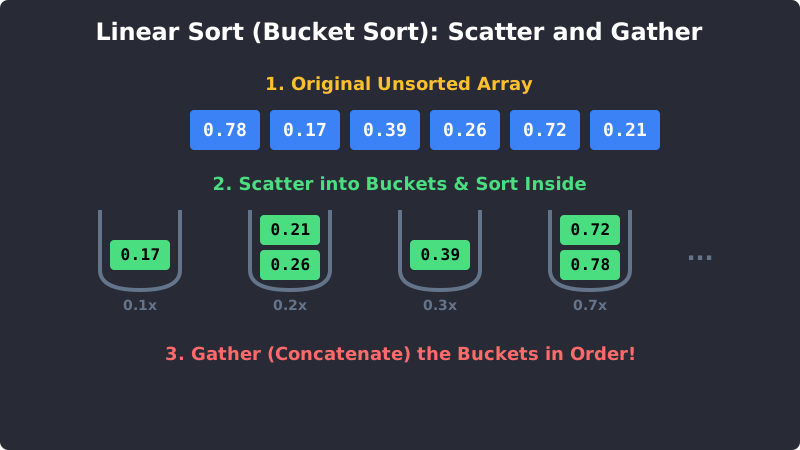
Bucket Sort: Scatter elements into buckets, sort the small buckets, and gather them back.
3. The Step-by-Step Process
Let's sort an array of decimals: [0.78, 0.17, 0.39, 0.26, 0.72, 0.21]
Step 1: Create Empty Buckets
We will create 10 buckets (representing ranges 0.0-0.1, 0.1-0.2, 0.2-0.3, etc.).
Step 2: Scatter into Buckets We multiply the number by 10 to find its bucket index!
0.78goes into Bucket7.0.17goes into Bucket1.0.39goes into Bucket3.0.26and0.21both go into Bucket2.0.72goes into Bucket7.
Step 3: Sort Inside Each Bucket
Bucket 2 currently has [0.26, 0.21]. We sort it to become [0.21, 0.26].
Bucket 7 currently has [0.78, 0.72]. We sort it to become [0.72, 0.78].
Step 4: Gather (Concatenate)
We simply read our buckets in order from 0 to 9.
Final Array: [0.17, 0.21, 0.26, 0.39, 0.72, 0.78].
4. Bucket Sort Code Example
Here is a Python implementation showing how easy Bucket Sort is to write for a list of floating-point numbers.
Bucket Sort in Python
def bucket_sort(arr): if len(arr) == 0: return arr # 1. Create 10 empty buckets bucket_count = 10 buckets = [[] for _ in range(bucket_count)] # 2. Scatter elements into buckets for num in arr: # Multiply by 10 to get the first digit as an index index = int(num * bucket_count) buckets[index].append(num) # 3. Sort individual buckets and 4. Gather them sorted_arr = [] for bucket in buckets: bucket.sort() # Sort the small bucket sorted_arr.extend(bucket) # Append it to our final list return sorted_arrnumbers = [0.78, 0.17, 0.39, 0.26, 0.72, 0.94, 0.21] print("Original:", numbers) print("Sorted:", bucket_sort(numbers))
5. Time and Space Complexity
- Average Time Complexity:
O(n + k). Wherenis the number of elements andkis the number of buckets. It is blazing fast if the numbers are evenly distributed! - Worst Case Time Complexity:
O(n²). If all numbers fall into the exact same bucket, Bucket Sort essentially becomes useless and defaults back to a slow comparison sort. - Space Complexity:
O(n + k). It uses extra memory to create the empty buckets.
Exercise 1 of 1
?How do Linear Sorting algorithms achieve O(n) speed while traditional algorithms like Merge Sort cannot?