Graphs
Introduction to Graphs
Key Takeaways: A Graph is a non-linear data structure consisting of Vertices (nodes) and Edges (lines that connect the nodes). Graphs are the ultimate tool for representing real-world networks.
So far, we have looked at Trees. A Tree is actually just a highly restricted, specialized type of Graph!
In a Tree, data flows strictly from top to bottom (Root to Leaves), and cycles (loops) are forbidden.
In a Graph, there are no rules. Any node can connect to any other node, in any direction, forming massive, complex webs of data.
1. Real-World Examples of Graphs
Graphs are arguably the most practical data structure in all of Computer Science. They power the apps you use every single day:
- Social Networks (Facebook / LinkedIn): You are a Vertex. Your friends are also Vertices. The "Friendship" between you is the Edge connecting you.
- GPS Maps (Google Maps): Cities or intersections are Vertices. The roads connecting them are Edges.
- The Internet: Routers and computers are Vertices. The physical fiber-optic cables connecting them are Edges.
- Recommendation Engines (Netflix / Amazon): Users and Movies are Vertices. Edges connect a user to a movie they liked.
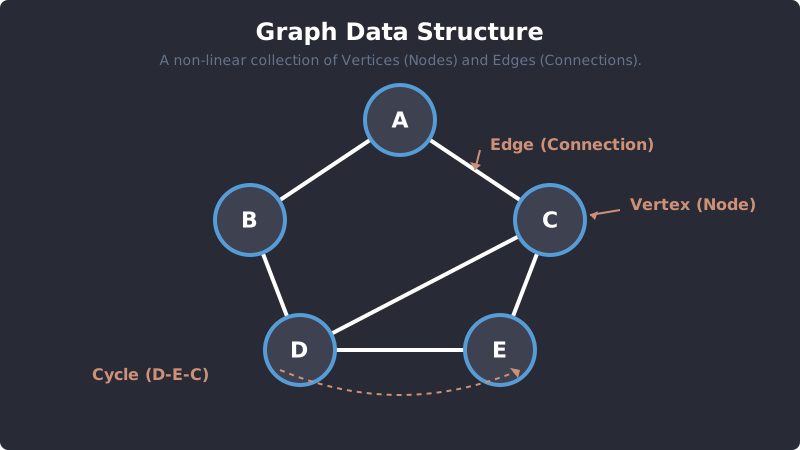
A Graph: Nodes can connect to any other node, allowing for cycles and complex relationships.
2. Graph Terminology
To talk about Graphs, you need to know the specific vocabulary:
- Vertex (Node): The entity storing the data (e.g., A person, a city).
- Edge: The line or link connecting two Vertices.
- Adjacent: Two vertices are "adjacent" if they are directly connected by an edge.
- Path: A sequence of edges you can follow to get from one Vertex to another.
- Cycle: A path that starts and ends at the exact same Vertex (a loop).
3. Types of Graphs
Graphs come in several different "flavors" depending on how their edges behave.
Undirected vs. Directed Graphs
- Undirected Graph: Edges have no direction. It is a two-way street. If Node A is connected to Node B, then Node B is also connected to Node A. (Example: A Facebook friendship).
- Directed Graph (Digraph): Edges have a strict direction, usually shown as arrows. Node A can point to Node B, but B does not necessarily point back to A. (Example: Twitter/X followers).
Unweighted vs. Weighted Graphs
- Unweighted Graph: All edges are treated equally. There is no "cost" to travel across them.
- Weighted Graph: Every edge has a number (a "weight" or "cost") assigned to it. (Example: On a map, the weight of a road might be the distance in miles, or the time it takes to drive it).
4. How to Represent a Graph in Code
In code, we don't draw circles and lines. We have to represent these connections using math and standard data structures. There are two standard ways to do this:
1. Adjacency Matrix
An Adjacency Matrix is a 2D Array (a grid).
- The rows and columns represent the Vertices.
- If there is an Edge between Vertex A and Vertex B, you place a
1in the grid. If there is no Edge, you place a0. - Pros: Instantly checking if an edge exists is
O(1)fast. - Cons: Takes up massive amounts of memory (
O(V²)space), even if there are barely any connections!
2. Adjacency List (Most Popular)
An Adjacency List uses a Hash Map (Dictionary) or an Array of Arrays.
- The Key is the Vertex.
- The Value is an Array containing all the Adjacent (connected) Vertices.
- Pros: Highly memory-efficient (
O(V + E)space). This is what you will use 99% of the time in interviews. - Cons: Finding a specific edge can be slightly slower than a matrix.
5. Coding an Adjacency List (Python)
Let's write a simple Python script to create an Undirected, Unweighted Graph using an Adjacency List (a Python Dictionary).
Graph Implementation (Adjacency List)
class Graph: def __init__(self): # We use a dictionary to map each Vertex to a List of connections self.adj_list = {}<span style="color: #569CD6;">def</span> add_vertex(self, vertex): <span style="color: #7c0075;"># If the vertex doesn't exist, add it with an empty array</span> <span style="color: #569CD6;">if</span> vertex <span style="color: #569CD6;">not</span> <span style="color: #569CD6;">in</span> self.adj_list: self.adj_list[vertex] = [] <span style="color: #569CD6;">def</span> add_edge(self, v1, v2): <span style="color: #7c0075;"># Make sure both vertices exist in the graph</span> <span style="color: #569CD6;">if</span> v1 <span style="color: #569CD6;">in</span> self.adj_list <span style="color: #569CD6;">and</span> v2 <span style="color: #569CD6;">in</span> self.adj_list: <span style="color: #7c0075;"># Since this is Undirected, we must add a connection both ways!</span> self.adj_list[v1].<span style="color: #8f0000;">append</span>(v2) self.adj_list[v2].<span style="color: #8f0000;">append</span>(v1) <span style="color: #569CD6;">def</span> display(self): <span style="color: #7c0075;"># Loop through the dictionary and print connections</span> <span style="color: #569CD6;">for</span> vertex <span style="color: #569CD6;">in</span> self.adj_list: <span style="color: #8f0000;">print</span>(vertex, <span style="color: #CE9178;">"-->"</span>, self.adj_list[vertex])# Let's test our Graph! g = Graph()
# Add Cities (Vertices) g.add_vertex("New York") g.add_vertex("London") g.add_vertex("Paris") g.add_vertex("Tokyo")
# Add Flights (Edges) g.add_edge("New York", "London") g.add_edge("London", "Paris") g.add_edge("Paris", "Tokyo") g.add_edge("London", "Tokyo") # London connects to two places!
print("Graph Adjacency List:") g.display()
6. Time and Space Complexity
(Note: V stands for Vertices, and E stands for Edges).
When using an Adjacency List:
- Add Vertex:
O(1). It is an instant Dictionary insertion. - Add Edge:
O(1). It is an instant Array append. - Space Complexity:
O(V + E). You only store the nodes that exist and the actual connections between them. Highly efficient.
Exercise 1 of 2
?In a standard Undirected Graph, what happens when you add an Edge between Node A and Node B?
Exercise 2 of 2
?Which of the following is the most memory-efficient way to represent a Graph in code?